How to contact Once Human Customer Support in-game
Join Once Architect on Discord · Already joined? Open #bugs-n-feedback.
Use official in-game Customer Support for bug reports needing direct assistance, missing items, account issues and follow-up on unresolved problems. A report on the Once Architect Community Tracker does not open an official support ticket.
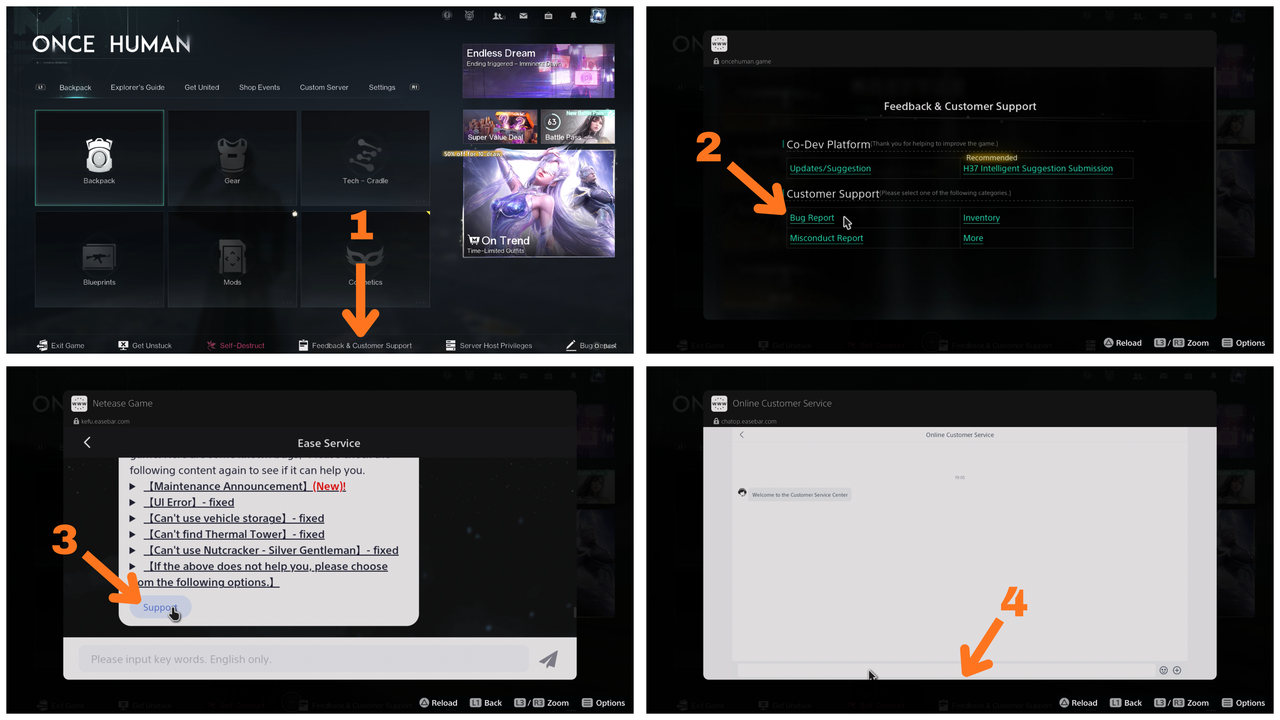
Follow these four steps
- Open the game menu and select Feedback & Customer Support along the bottom.
- Under Customer Support, choose Bug Report. Use Inventory, Misconduct Report or More when that better matches your issue.
- Read the suggested answers. If they do not resolve the issue, select Support.
- The Online Customer Service conversation opens. Enter your issue in the message box and follow the support prompts.
What to send
- Your game UID, region, server/scenario and platform.
- When it happened, including your timezone.
- What happened, steps to reproduce, and what should happen instead.
- At least one screenshot or a short video, plus any workaround you tried.
- An existing ticket or feedback number if you are following up.
Keep your support conversation and ticket details so you can reply if staff request more information. Never share passwords, login codes or payment details publicly.