How to submit Once Human Co-Dev feedback and find your report ID
Join Once Architect on Discord · Already joined? Open #bugs-n-feedback.
Submit your feedback officially first, then share it in our Discord bugs & feedback channel for clarification and review. The tracker is community-maintained and is not official Once Human support.
1. Open the official Co-Dev platform
Visit Once Human Co-Dev Feedback Platform. You can also open it in-game through Feedback & Customer Support → Co-Dev Platform → Updates/Suggestion. Button wording varies by platform and version.
For a bug needing direct assistance, also follow our in-game Customer Support guide. Official guidance directs bugs and account/item assistance to Customer Support, and suggestions to Co-Dev.
2. Sign in and link your character
Select Login, then Link Character if prompted. Use the character associated with your feedback when checking its history.
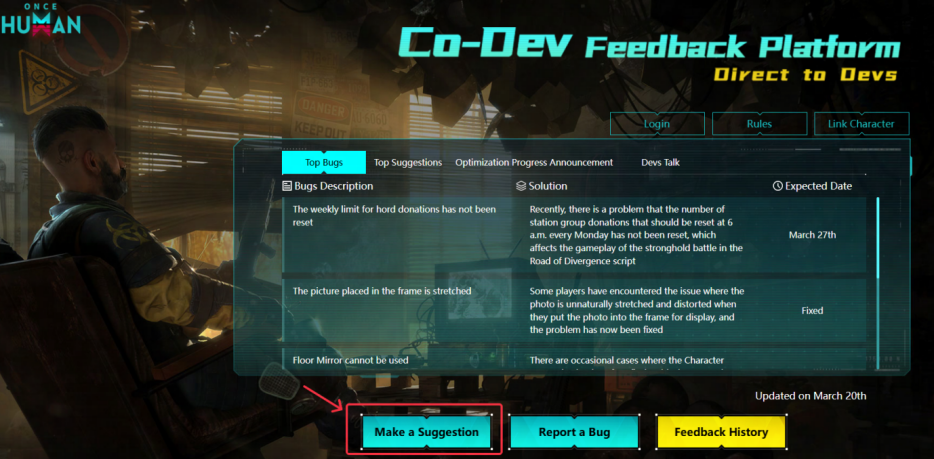
3. Submit one bug or suggestion
Choose Make a suggestion for a request, or Report a bug if that option is available. If bugs are routed to Customer Support, use the in-game Bug Report route instead.
- Bug: what happened, steps to reproduce, expected result, actual result, platform and server.
- Request: the problem, your proposed improvement and who it would help.
- Add at least one relevant screenshot or video. Remove private information.

4. Copy your Co-Dev Order Number
After submitting, open Feedback History, locate the entry and copy its Order Number, including its letter. This is your feedback/report ID—not your game character UID or Discord user ID.
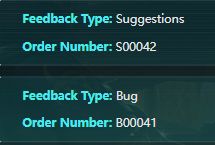
S00042 and B00041 are examples only. Use your own number.5. Share the report in Discord
Post in our Discord bugs & feedback channel. Follow the template.
Jesstron may ask for clarification before manually queueing the finalized report. The Community Tracker displays approved reports.
A Co-Dev ID does not itself mean the developer has confirmed the issue. If you cannot obtain a number for a support-only bug, explain this in Discord rather than inventing one.